
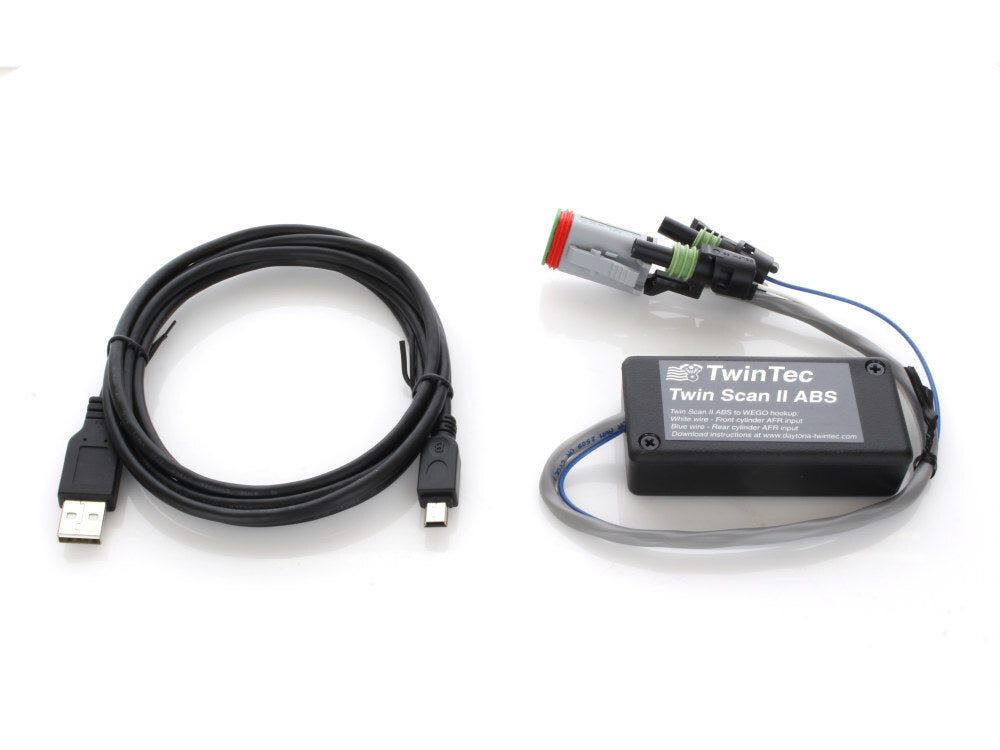
Daytona Twin Tec DTT-15202 Twin Scan II ABS Scan Tool for all Delphi system 01-10
Daytona Twin Tec DTT-15202 Twin Scan II ABS Scan Tool for all Delphi system 01-10 is backordered and will ship as soon as it is back in stock.
- Ready to dispatchShips Australia-wide
- Online onlyNot sold in-store

Need a hand with this product?
Sizing, fitment or specs — our team can help.
Mon–Fri 8:30am–5pm
Twin Scan II ABS – Scan Tool – Read and Clear Codes + Bleed ABS Brakes
• Compatible with 2001-2014 H-D models using Delphi EFI system (including V-Rod®) with J1850 data bus and 2003-2006 carb models with single 12 pin ignition module.
Note: Twin Scan II is NOT compatible with 2011 & later models with the CAN data bus. Can bus models require (2011-2020) Twin Scan 4 pn: 15500
• Anti-skid brake system (ABS) brake bleeding functions for 2008-2013 touring models. For more information, refer to the Twin Scan II Tech FAQ.
• Read and clear diagnostic trouble codes from engine control module (ECM), turn signal/security module (TSM/TSSM), speedometer, tach, and anti-skid braking system (ABS).
• Real time display of engine data on instrument panel type display
• Built-in data logging. Stores up to 45 minutes of data. Automatically triggers when a trouble code is set. Shows data before and after code is set
• Displays throttle position and twist grip sensor data on new 2008-2013 touring models with electronic throttle control
• Requires a Windows PC to display, read and clear codes (XP, 7, 8, 10, 11)
• Includes two analog inputs for monitoring air/fuel ratio (AFR).
• Compact size: 3.1″L x 1.6″W x 0.8″H
Many 2001-2014 Harley-Davidson® motorcycles use the SAE J1850 data bus for communications between the engine control module (ECM), instrument module (IM), turn signal/security module (TSM/TSSM), anti-skid braking system (ABS) and diagnostic scan tools. The Twin Scan II ABS is a low cost scan tool that is compatible with 2001-2014 H-D® fuel injected models using the Delphi® fuel injection system (including V-Rod®) with J1850 data bus and 2003-2006 carbureted models with the single 12 pin ignition module.
Note: 2011 and later Softail® , 2012 and later Dyna®, 2014+ touring models, 1999-2003 carbureted Twin Cam 88® models and all models with the earlier Marelli® fuel injection lack the J1850 data bus and are not compatible with the Twin Scan II.
The Twin Scan II ABS plugs into the four terminal Deutsch style data link connector located on the OE H-D® wiring harness and requires a laptop PC for user interface and data display. You can read and clear diagnostic trouble codes from the ECM, TSM/TSSM, speedometer, tach (on models with IM data bus), and ABS (if equipped). You can view real time engine data on an instrument panel type display.
The Harley Davidson ABS scan tool also features stand-alone data logging (no laptop PC attached). This feature provides diagnostic capabilities not found in any other available tools. The Twin Scan II ABS is especially useful for diagnosing hard to find intermittent trouble codes. The motorcycle can be operated while the unit is installed. Under normal conditions (no trouble code), the unit can be set up to store data for the last hour of operation. If a trouble code is set, the unit automatically stops logging data 30 minutes after the code is set. Even days or weeks later, you can download the data. You can examine in detail what happened before and after the code was set. You have a range of capabilities for analyzing and printing out logged data that is displayed in a chart recorder format.
Twin Scan II Software
The Twin Scan software has four major functions: reading and clearing diagnostic trouble codes, displaying real time engine data, displaying logged data, and analyzing AFR data (if used with optional WEGO IIID).
Diagnostic Trouble Codes
The unit will display information for all available modules (this includes the speedometer and tach on models with the instrument module on the data bus and the ABS). The upper half of the screen displays the system ID and calibration code information. The lower half of the screen displays diagnostic trouble codes. Each current and historic trouble code is displayed along with a brief description. The software includes a database of all diagnostic trouble codes published by Harley-Davidson®. You can then refer to the H-D® Electrical Diagnostic Manual for your model for detailed explanations and troubleshooting flowcharts.
You can print the displayed information to any Windows printer by clicking on the Print Codes button. You can clear any codes by clicking on the Clear Codes button.
ABS Brake Bleeding Functions
ABS brake bleeding functions are available on all Twin Scan II ABS units that have been manufactured since 2014 (version 3.0 or higher firmware). If you attempt to use the ABS brake bleeding functions with older Twin Scan II units, an error message will be displayed. Older Twin Scan II units can be upgraded – give us a call for details.
ABS brake bleeding should only be performed by a trained and experienced mechanic. Individual front and rear ABS brake bleeding functions are available. If you are only servicing the front or rear brake section, you do not need to bleed the opposite section.
Real Time Engine Data
You can display real time engine data on an instrument panel type layout with round tach and speedometer gauges and bar graph type gauges for most other parameters. Barometric pressure, idle RPM and system status are displayed in additional boxes. If the engine is not running, most values will appear as zero. The screen snapshoot below shows the parameters displayed for a 2010 touring model with electronic throttle control. A subset of these parameters is displayed for other engine systems.
2008-2013 touring models feature electronic throttle control. In order to test and tune these models, you need to know the position of the twist grip sensor (TGS) and electronic throttle actuator (TPS). The Twin Scan II ABS real time engine data display gives you this critical information (TGS% and TPS% in the upper right corner of the screen).
You can log data directly to the laptop PC while real time engine data display is active by clicking on the Start Data Logging button. Data is logged to a buffer memory on the laptop PC that stores 1450 data points using data logging interval ranging from 0.25 to 2.0 seconds. You can start and stop data logging as desired. The last 1450 data points will remain in the program data buffer.
Data Logging
You can display data downloaded from the Twin Scan II ABS (if the unit has been operated on the motorcycle in stand-alone mode) or directly logged while real time display was active. The logged data appears on a chart recorder type screen. The screen snapshot below shows the complete set of parameters. Depending on the actual engine control system, a subset of these parameters is displayed. You have a range of capabilities for analyzing and printing the data. Data can also be saved to a file for future reference.
AFR Data Analysis
The Twin Scan 2/4 Complete Kit includes the WEGO IIID dual channel wide-band oxygen sensor system. When the WEGO IIID is connected to the Twin Scan II ABS, the system log engine data along with the actual front and rear cylinder air/fuel ratio (AFR). The Twin Scan 2/4 Complete Kit is an ideal tuning aid and is super helpful when tuning HD fuel injected motorcycles. The figure below shows logged AFR data that has been analyzed and displayed in Twin Cam format. You can select from 11 different formats for both Twin Cam and VRSC (V-Rod) engines. AFR data is displayed with the same RPM rows and throttle position sensor (TPS) or manifold pressure (MAP) columns used with most engine mapping systems.
You can also display and print out the required volumetric efficiency (VE) correction (in percent) based on the AFR command. This gives you the required fuel correction. You can add data from an unlimited number of files that you previously saved. The data will be analyzed and incorporated into the table. Cells that vary more than ±0.5 AFR from the command value are shaded blue for rich or red for lean.
You can use two approaches to make the required corrections in third party engine mapping systems. If you have Microsoft Office with Excel, you can directly copy and paste data from the Twin Scan II software to an Excel spreadsheet and then copy and paste from the Excel spreadsheet into the engine mapping software. In the Twin Scan II software, you can select a range of cells with the mouse and right click to bring up a copy menu. You can also left click on the upper left legend cell to select the entire table and then right click to bring up the copy menu. For more details on using Excel, including sample spreadsheets, please visit the Twin Scan II Tec FAQ. Alternately, you can manually enter the required corrections in the engine mapping software by referring to the printed VE percent correction table and marking off cells as you edit them. When used with the Daytona Twin Tec Twin Tuner, the program can directly export VE correction data to Twin Tuner data files.
The Twin Scan II software used for all versions of the Twin Scan II runs under Microsoft Windows XP/Vista/7/8/10/11. We no longer support older Windows versions. Minimum PC requirement is a 300 MHz Pentium with super VGA display (SVGA with 1024 x 768 pixel resolution). The Twin Scan II ABS connects to the PC by means of a USB interface. A USB cable is supplied with the unit. The PC must have a free USB port. If you have an older PC without USB capability, you cannot use the Twin Scan II ABS. For more detailed product information, we suggest that you download the Twin Scan II software and instructions. The software download includes sample files with actual data.
Exhaust Sniffers
The Twin Scan II ABS Plus kit can be used with an exhaust sniffer that allows temporary installation on most motorcycles for tuning and diagnostic purposes. JimsUSA offers an exhaust sniffer, P/N 777, suitable for use with the WEGO. For additional information on do-it-yourself sniffers, refer to our Motorcycle Exhausts Sniffer Tech Note.
2010 and later touring models and all 2012 and later models are equipped with miniature 12mm oxygen sensors. The Bosch LSU 4.2 wide-band oxygen sensors used by the Twin Tuner 2/4 Complete kits are 18mm and will not fit. Smaller 12mm wide-band sensors are not available. The best solution is to install our larger 18mm O2 sensor bungs alongside the OE 12mm sensors. Link to our 18mm O2 sensor bungs.
Other O2 sensor test solutions also exist: Bay Area Performance Cycles (Phone: 650-969-0372) sells an oxygen sensor manifold kit (suggested retail price $469.00) that allows easy installation of Bosch LSU 4.2 wide-band sensors on any exhaust system for testing purposes. The process involves drilling small holes and using a special tool to install threaded fittings for the sensor manifolds. After testing, button head stainless steel screws are installed in place of the sensor manifolds and the heat shields are reinstalled.
**Please Note: The fitment information below has been generated as a guide and may not be 100% accurate. Please contact us if you require further assistance.
- Harley-Davidson Dyna Defender FXDP : 2002–2004
- Harley-Davidson Dyna Fat Bob CVO FXDFSE : 2009
- Harley-Davidson Dyna Fat Bob CVO FXDFSE2 : 2010
- Harley-Davidson Dyna Fat Bob FXDF : 2008–2011
- Harley-Davidson Dyna Low Rider EFI FXDLI : 2004–2006
- Harley-Davidson Dyna Low Rider FXDL : 2000–2005, 2007–2011
- Harley-Davidson Dyna Street Bob EFI FXDBI : 2006
- Harley-Davidson Dyna Street Bob FXDB : 2007–2011
- Harley-Davidson Dyna Super Glide 35th Anniversary EFI FXDI35 : 2006
- Harley-Davidson Dyna Super Glide Custom EFI FXDCI : 2005–2006
- Harley-Davidson Dyna Super Glide Custom FXDC : 2005, 2007–2011
- Harley-Davidson Dyna Super Glide CVO FXDSE : 2007
- Harley-Davidson Dyna Super Glide CVO FXDSE2 : 2008
- Harley-Davidson Dyna Super Glide EFI FXDI : 2004–2006
- Harley-Davidson Dyna Super Glide FXD : 2000–2005, 2007–2010
- Harley-Davidson Dyna Super Glide Sport EFI FXDXI : 2004–2005
- Harley-Davidson Dyna Super Glide Sport FXDX : 2000–2005
- Harley-Davidson Dyna Super Glide T Sport FXDXT : 2001–2003
- Harley-Davidson Dyna Wide Glide EFI FXDWGI : 2004–2006
- Harley-Davidson Dyna Wide Glide FXDWG : 2000–2005, 2007–2008, 2010–2011
- Harley-Davidson Softail Convertible CVO FLSTSE : 2010
- Harley-Davidson Softail Convertible CVO FLSTSE2 : 2011
- Harley-Davidson Softail Cross Bones FLSTSB : 2008–2010
- Harley-Davidson Softail Custom FXSTC : 2007–2010
- Harley-Davidson Softail Deluxe EFI FLSTNI : 2005–2006
- Harley-Davidson Softail Deluxe FLSTN : 2006–2010
- Harley-Davidson Softail Deuce CVO FXSTDSE2 : 2004
- Harley-Davidson Softail Deuce EFI FXSTDI : 2001–2006
- Harley-Davidson Softail Deuce FXSTD : 2000–2007
- Harley-Davidson Softail Fat Boy CVO FLSTFSE : 2005
- Harley-Davidson Softail Fat Boy EFI FLSTFI : 2001–2006
- Harley-Davidson Softail Fat Boy FLSTF : 2002–2010
- Harley-Davidson Softail Fat Boy Lo FLSTFB : 2010
- Harley-Davidson Softail Heritage Classic EFI FLSTCI : 2002–2006
- Harley-Davidson Softail Heritage Classic FLSTC : 2002–2010
- Harley-Davidson Softail Heritage EFI FLSTI : 2006
- Harley-Davidson Softail Heritage FLST : 2002–2003, 2005–2006, 2008–2010
- Harley-Davidson Softail Heritage Springer Classic EFI FLSTSCI : 2005
- Harley-Davidson Softail Heritage Springer Classic FLSTSC : 2005
- Harley-Davidson Softail Heritage Springer EFI FLSTSI : 2001–2003
- Harley-Davidson Softail Heritage Springer FLSTS : 2002–2003
- Harley-Davidson Softail Night Train EFI FXSTBI : 2001–2006
- Harley-Davidson Softail Night Train FXSTB : 2002–2009
- Harley-Davidson Softail Rocker C FXCWC : 2008–2010
- Harley-Davidson Softail Rocker FXCW : 2008–2009
- Harley-Davidson Softail Springer Classic EFI FLSTSCI : 2006
- Harley-Davidson Softail Springer Classic FLSTSC : 2006–2007
- Harley-Davidson Softail Springer CVO FXSTSSE : 2007
- Harley-Davidson Softail Springer CVO FXSTSSE2 : 2008
- Harley-Davidson Softail Springer CVO FXSTSSE3 : 2009
- Harley-Davidson Softail Springer EFI FXSTSI : 2001–2006
- Harley-Davidson Softail Springer FXSTS : 2002–2006
- Harley-Davidson Softail Standard EFI FXSTI : 2001–2006
- Harley-Davidson Softail Standard FXST : 2002–2010
- Harley-Davidson Sportster 1200 50th Anniversary XL50 : 2007
- Harley-Davidson Sportster 1200 Custom Anniversary XL1200C : 2013
- Harley-Davidson Sportster 1200 Custom XL1200C : 2004–2013
- Harley-Davidson Sportster 1200 Custom XLH1200C : 2002–2003
- Harley-Davidson Sportster 1200 Forty Eight XL1200X : 2010–2013
- Harley-Davidson Sportster 1200 Low XL1200L : 2006–2011
- Harley-Davidson Sportster 1200 Nightster XL1200N : 2007–2012
- Harley-Davidson Sportster 1200 Roadster XL1200R : 2004–2009
- Harley-Davidson Sportster 1200 Seventy Two XL1200V : 2012–2013
- Harley-Davidson Sportster 1200 Sport XLH1200S : 2002–2003
- Harley-Davidson Sportster 1200 Standard XLH1200 : 2002–2003
- Harley-Davidson Sportster 883 Custom XL883C : 2004–2009
- Harley-Davidson Sportster 883 Custom XLH883C : 2002–2003
- Harley-Davidson Sportster 883 Hugger XLH883 : 2002–2003
- Harley-Davidson Sportster 883 Iron XL883N : 2010–2013
- Harley-Davidson Sportster 883 Low XL883L : 2005–2010
- Harley-Davidson Sportster 883 Roadster XL883R : 2005–2013
- Harley-Davidson Sportster 883 Roadster XLH883R : 2002–2003
- Harley-Davidson Sportster 883 Standard XL883 : 2004–2009
- Harley-Davidson Sportster 883 Standard XLH883 : 2002–2003
- Harley-Davidson Sportster 883 SuperLow XL883L : 2011–2013
- Harley-Davidson Touring Electra Glide Classic EFI FLHTCI : 2002–2006
- Harley-Davidson Touring Electra Glide Classic FLHTC : 2002–2013
- Harley-Davidson Touring Electra Glide Police EFI FLHTPEI : 2006
- Harley-Davidson Touring Electra Glide Police EFI FLHTPI : 2002–2006
- Harley-Davidson Touring Electra Glide Police FLHTP : 2007–2013
- Harley-Davidson Touring Electra Glide Standard EFI FLHTI : 2003–2006
- Harley-Davidson Touring Electra Glide Standard FLHT : 2002–2009
- Harley-Davidson Touring Electra Glide Ultra Classic CVO Anniversary FLHTCUSE8 : 2013
- Harley-Davidson Touring Electra Glide Ultra Classic CVO FLHTCUSE2 : 2007
- Harley-Davidson Touring Electra Glide Ultra Classic CVO FLHTCUSE3 : 2008
- Harley-Davidson Touring Electra Glide Ultra Classic CVO FLHTCUSE4 : 2009
- Harley-Davidson Touring Electra Glide Ultra Classic CVO FLHTCUSE5 : 2010
- Harley-Davidson Touring Electra Glide Ultra Classic CVO FLHTCUSE6 : 2011
- Harley-Davidson Touring Electra Glide Ultra Classic CVO FLHTCUSE7 : 2012
- Harley-Davidson Touring Electra Glide Ultra Classic CVO FLHTCUSE8 : 2013
- Harley-Davidson Touring Electra Glide Ultra Classic EFI FLHTCUI : 2002–2006
- Harley-Davidson Touring Electra Glide Ultra Classic FLHTCU : 2005, 2007–2013
- Harley-Davidson Touring Road Glide Custom CVO Anniversary FLTRXSE2 : 2013
- Harley-Davidson Touring Road Glide Custom CVO FLTRXSE : 2012
- Harley-Davidson Touring Road Glide Custom CVO FLTRXSE2 : 2013
- Harley-Davidson Touring Road Glide Custom FLTRX : 2010–2013
- Harley-Davidson Touring Road Glide CVO FLTRSE3 : 2009
- Harley-Davidson Touring Road Glide EFI FLTRI : 2002–2006
- Harley-Davidson Touring Road Glide FLTR : 2002–2003, 2007–2009
- Harley-Davidson Touring Road Glide Ultra CVO FLTRUSE : 2011
- Harley-Davidson Touring Road Glide Ultra FLTRU : 2011–2013
- Harley-Davidson Touring Road King Classic EFI FLHRCI : 2002–2006
- Harley-Davidson Touring Road King Classic FLHRC : 2007–2013
- Harley-Davidson Touring Road King Custom EFI FLHRSI : 2004–2006
- Harley-Davidson Touring Road King Custom FLHRS : 2004–2007
- Harley-Davidson Touring Road King CVO Anniversary FLHRSE5 : 2013
- Harley-Davidson Touring Road King CVO EFI FLHRSEI2 : 2003
- Harley-Davidson Touring Road King CVO FLHRSE3 : 2007
- Harley-Davidson Touring Road King CVO FLHRSE4 : 2008
- Harley-Davidson Touring Road King CVO FLHRSE5 : 2013
- Harley-Davidson Touring Road King EFI FLHRI : 2002–2006
- Harley-Davidson Touring Road King FLHR : 2002–2006, 2008–2013
- Harley-Davidson Touring Road King FLHR Anniversary : 2013
- Harley-Davidson Touring Road King Police CA EFI FLHPEI : 2005
- Harley-Davidson Touring Road King Police CA FLHPE : 2008–2011
- Harley-Davidson Touring Road King Police EFI FLHPI : 2002, 2005–2006
- Harley-Davidson Touring Road King Police FLHP : 2008–2013
- Harley-Davidson Touring Road King Police FLHPI : 2003
- Harley-Davidson Touring Street Glide CVO FLHXSE : 2010
- Harley-Davidson Touring Street Glide CVO FLHXSE2 : 2011
- Harley-Davidson Touring Street Glide CVO FLHXSE3 : 2012
- Harley-Davidson Touring Street Glide EFI FLHXI : 2006
- Harley-Davidson Touring Street Glide FLHX : 2006–2013
- Harley-Davidson Touring Ultra Limited Anniversary FLHTK : 2013
- Harley-Davidson Touring Ultra Limited FLHTK : 2010–2013
- Harley-Davidson Trike Street Glide FLHXXX : 2010–2011
- Harley-Davidson Trike Tri Glide Ultra Classic FLHTCUTG : 2009–2013
- Harley-Davidson V Rod 10th Anniversary Edition VRSCDX : 2012
- Harley-Davidson V Rod CVO VRSCSE : 2005–2006
- Harley-Davidson V Rod Muscle VRSCF : 2009–2017
- Harley-Davidson V Rod Night Rod Special VRSCDX : 2012–2017
- Harley-Davidson V Rod Night Rod VRSCD : 2006–2007
- Harley-Davidson V Rod Street Rod VRSCR : 2006–2007
- Harley-Davidson V Rod VRSCA : 2002–2006
- Harley-Davidson V Rod VRSCB : 2004–2005
(Part Numbers: ROL-DTT-15202)